Showing posts with label bypass. Show all posts

Thursday, April 2, 2015

GatherProxy Scraper Premium Version

GatherProxy Scraper is a small tool developed by Gatherproxy.com. With this tool you can easily collect millions of proxies quickly. It helps you to checking and filtering proxies by multiple different criteria. By default, the list using for harvest proxies will be taken from our server but you can also create a separate list.


Awards: 
GatherProxy got 5 stars by http://www.softpedia.com editor and "Excellent" by users. 

Features: 

  • GatherProxy Scraper harvest thousands fresh proxies from over 300 websites. We are udpated the list daily to make sure those site is also udpate their proxies daily. You can also extract proxies from more top site. 
  • HTTP proxy checker, Socks 4/5 checker, SSL checker, Black List checker, Google Passed proxies checker. 
  • Custom leeching source, including page leeching option to find links with more proxies. If you do not want to use default provides by us, you can select this options. Each website address on one lines and the number of websites are unlimited. 
  • You may not install this tool for use. The tool really compact and save your memory resource for PC. 
  • Url Expression feature, this is allow harvest proxies from Google Search, Forum or any site with smart method.

D0WNL0AD LINKS:

Download
Filesize: 1.3MB
GatherProxy.rar

Wednesday, February 18, 2015

No Fair Use Policy, No 800 MB Data Capping for GLOBE Prepaid


Hello. mga kasymb share ko lang yung tricks kung paano mabypass yung 800mb Fair Use Policy ni GLOBE Prepaid..
Good Day readers, recently I've shared  Trick to Bypass Globe Prepaid Supersurf 800MB Limit Fair Usage Policy Sucks . Today I am going to share you some tricks on how to bypass 800mb Limit by using other way.

NOTE:
1. This tricks only work with GLOBE Prepaid LTE Simcard
2. Please only use for this to work Desktop PC, Netbook at Laptop na Windows Operating System
3. You can use GLOBE Prepaid LTE Simcard sa 3G at 4G Mobile WiFi and USB Dongle Stick
4. GLOBE Prepaid LTE Simcard has data capping, because this is just a new release by  GLOBE last December, and there was no setting on their system for having a bloody cap.
5. The GLOBE LTE signal is only available in whole.. even with 3G o 4G Signal you can use  GLOBE Prepaid LTE Simcard just have signal and has Internet promo on GLOBE Prepaid. such as SUPERSURF..
6. I am not with GLOBE and not even an endorser of GLOBE Prepaid LTE. I just want to share this for you to know that you can really bypass that shitty 800MB Data limit of GLOBE without spending lots of cash or using any tunneling application software such as VPN or Proxy.


The Steps are very simple my fellow readers:
1. Just use GLOBE Prepaid LTE Simcard... this simcard is optimize and made only for Data Connectivity and not limited on Fair Use Policy of GLOBE Prepaid.
2. You can you any SUPERSURF denomination promo.
3. You can gain much faster speed because you're using an LTE Connection with up to 42 MBPs

ADDITIONAL NOTES:
1. If you're planning to buy GLOBE Prepaid LTE Simcard on Globe Stores you can get it for Only 40 Pesos its called Combi Sim, (Combination of Regular and Micro Simcard for Android Users) and 75 pesos on Nano Sim for Iphone Users
2. This tips are best for 0905 prefix GLOBE LTE Users so better check the prefix before buying.

Thanks Happy Browsing.

Credits to symbianizer: lushy25

SCREENSHOTS are Uploaded to our Facebook Groups be sure to visit

Saturday, December 27, 2014

Trick to Bypass Globe Prepaid Supersurf 800MB Limit Fair Usage Policy Sucks


Once you register with globe Supersurf50 the said 1 day unlimited surfing (but not Unlimited Downloading) you are entitled to have 800MB Limit of data to access the internet, meaning to say after you've consumed the said limit you will be switch to 2G signal access which lowers your speed down to 10kbps, and you will receive such message like this:

Number: 8888
Content:
Hello! We noticed that your data usage today has been really high. We're now reducing your browsing speed to
maintain quality service for all Globe users. Please be guided by our acceptable terms on fair use for browsing
 promos, which you can read about at surf.globe.com.ph/fup. To browse at normal speeds, you can unsubscribe f
rom your current promo by texting STOP <PROMO> to 8888. Regular browsing rates will apply thereafter. Thanks!

that sucks right? Luckily we hackers have the solution for that not to make your angry with suck telecom that makes ton of cash and limit their subscriber as long as they wanted.

BASICALLY, GLOBE IS USING TWO APNs:
-------------------------------------------------------------------

 http.globe.com.ph and  www.globe.com.ph

-------------------------------------------------------------------

 http.globe.com.ph - (INET) is the default setting in
our dashboard (Ramdam naten ang bilis ng connection
dito kapag hindi throttled ang sim card naten because
it provides high download rate and low ping.

ADVANTAGE:

- - Faster browsing - -

DISADVANTAGE:

- - When you are detected and abusively
using it for streaming and heavy download,
You may be throttled. So warning! Wag na wag
magcoconnect sa APN na yan kung
Magdownload at Magyoutube ang gagawin - -

-------------------------------------------------------------------

 www.globe.com.ph - (MyGlobeConnect)
- Is the internet settings for CP users ,
Proxified through 203.177.42.214 port 8080.

DISADVANTAGE:

- - Not good enough for browsing
- - Mabagal ang page loading .
Needs to accelerate first to get packet connection. (High Ping)

ADVANTAGE:

- -"NO THROTTLING ''
- - Edit- 10/21/2012 - Misleading yung message dito
palitan ko na lang, Magdownload ka with no worries
about internet throttling!

Heres the proceedure:

DASH BOARD SETTINGS: JUST FOLLOW SETTINGS
ON THE SCREEN SHOTS PROVIDED.
Profile name: Anything you want
APN: www.globe.com.ph
Access Number: *99#

1. CONNECT YOUR DASHBOARD WITH THE SAID SETTINGS
2. RUN Webproxytool.exe
- No need to click Go.
gagamitin lang naten yung proxifier nya.
Nakaset na yan sa 203.177.42.214 port 8080
para wala ng paligoy ligoy.
3. Stream and Download.

Tuesday, May 20, 2014

Bypass Windows Folder Security Check(Access Denied) to Access and Enter into Protected folders

Many of my friends asked me that, some times they cannot enter into some system folders and files of Windows XP, 7. When they to enter into those folders, a error or security message prompt is shows like “This folder access is denied” or “You cannot access this folder due to security reasons”or “Location is unavailable”. Why it happens? Because actually there is an another hidden administrator on your windows system which is called “System Administrator”. System administrator always try to protect your windows from being unauthorized access.
Now you have to do a little hack(trick) to access any protected folder or file and take control over it. It’s not a crack. You have to make changes to the registry settings to get the administrative power to browse system folders and open protected files.
Editing registry manually is not suitable for all jobs on windows computer. Some times it is risky and also confusing.

So you have to use a specific registry editor reg file to edit registry settings to take access on folders and files.
TakeOwnerShip.reg is the most famous and safe registry editor to take control over protected files and folders.
Now let’s take a tour of this job.

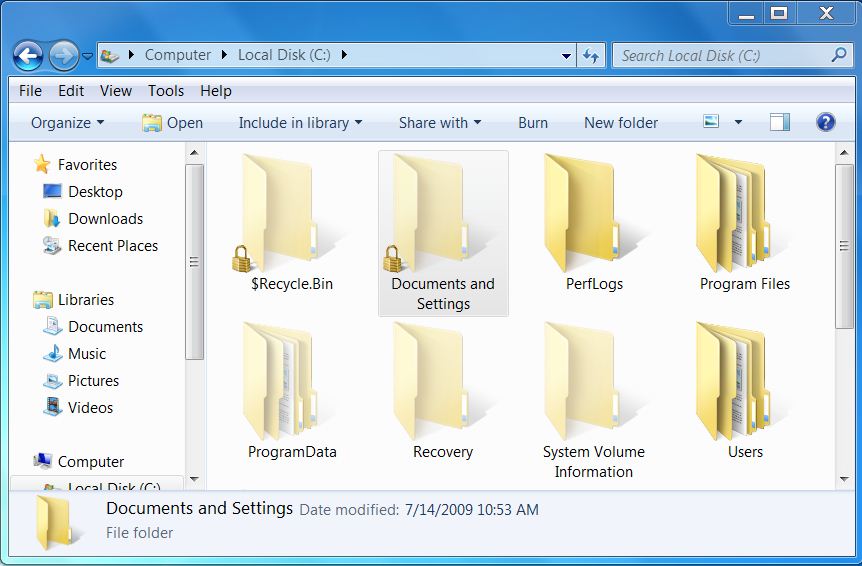
1. Now I will try to enter into a protected ‘Documents and Settings’ folder without taking control or editing registry. So it will show an error message.

protected system folder ‘Documents and Settings’
error: Access is denied.
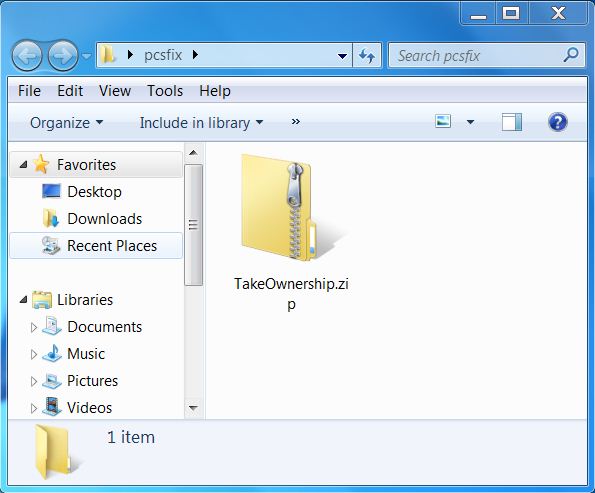
takeownership for bypass system security check
3. Enter into the zip package and you will see to registry editor file. One is InstallTakeOwnership.reg and another is RemoveTakeOwnership.reg.
installtakeownership.reg and removetakeownership.reg
4. Now click on InstallTakeOwnership.reg file and you will be prompt with a security message as below.
edit registry settings
5. Click on yes to edit registry settings. And ok.
confirm registry settings
6. Now go to the folder where you wan
t to enter. And right click on the folder.
select takeownership to take control.
7. In the right click menu you will see a new entry ” Take OwnerShip”. Select it.
8. After selecting Take Ownership, you will be prompted with a security message. Select yes to proceed.
9. Now you will see a running windows dos command window as below, which is granting your access.
10. After finishing this automatic dos command prompt, you will have access to enter into that folder.
11. For example, I have now power to enter into ‘Documents and Settings ‘ folder.
12. Do the same for other folders and files to bypass system security check.
Don’t forget to leave comments to share your opinion about this article. Thanks.